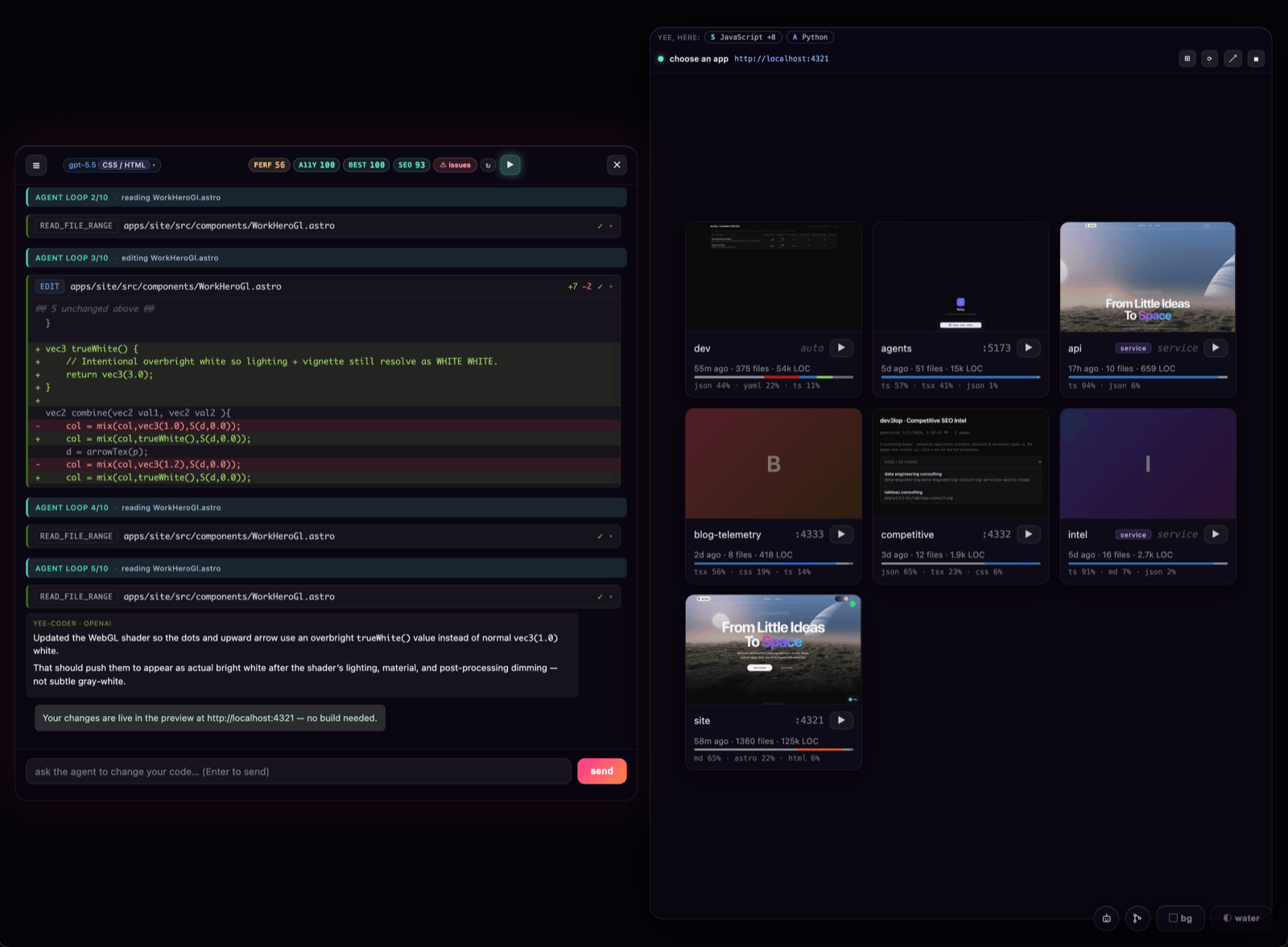
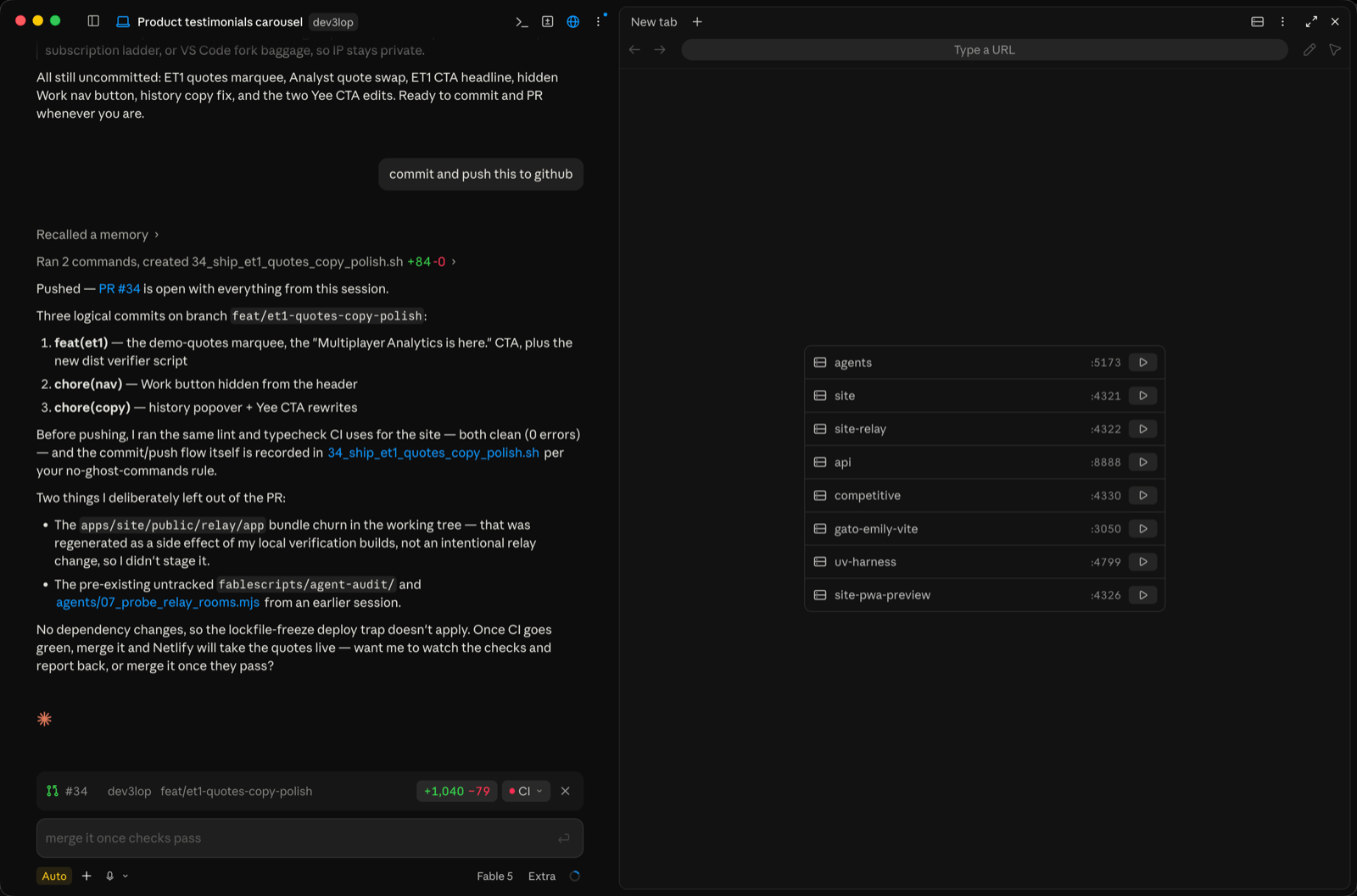
Two screenshots, taken the same morning, in two different editors, on two different repos. The question being answered in both panes is identical: can I see my app?
The first is Yee, our editor. You open a repo and the preview pane says choose an app: every runnable app in the monorepo, laid out as a card with a play button, a port, and a little KPI strip — 58m ago · 1360 files · 125k LOC — plus a language-makeup bar. Click play. The server starts, the pane points itself at the localhost URL, and you’re looking at your app. The agent never got involved. No tokens were spent.
The second is Claude Code — which we genuinely like, and which we use daily — open on a different repo of ours. Same kind of list, also with play buttons. But the road to that list ran through the agent: the launch config behind it was authored by the model, the decision to start a server routes through the model, and verifying the thing actually came up is the model reading logs. Every step of that is inference. Every step of that is billed.
This post is about the gap between those two screenshots, why we think it quietly makes AI-editor companies a lot of money, and — because we’d rather publish the recipe than pretend it’s a moat — exactly how we solved it.
The most expensive boolean in software
“Is the dev server running?” is a boolean. You check whether the process is alive and whether it printed a localhost URL. If yes, show the page. If no, run the dev script from package.json and wait for the URL. That condition is consistent every single time. There is nothing to reason about.
A software engineer never notices this problem, because a software engineer just opens a terminal and types npm run dev. But the whole promise of agentic editors — Claude Code, Cursor, Windsurf, Codex — is that you don’t have to be that person. And the moment you aren’t, the shell disappears as an option, and the only remaining path to “let me see my app” is asking the agent. So the agent reasons about your package.json, picks a command, runs it, watches the output, tells you the URL, and later — because models are trained to verify — runs a build or starts a second server just to check its own work.
That’s a model doing a boolean’s job. Multiply it by every session, every user who’s never touched a terminal, every “can you show me what it looks like now?” — and our back-of-napkin math says this one unsolved UX seam is worth hundreds of thousands of dollars a month, or more, to the companies selling tokens. We can’t audit their books, so take that as the estimate it is. But the shape of it is undeniable: the less your user knows about shells, the more inference they buy to compensate, and starting servers is the single most repetitive thing they buy it for.
We’ve written before about where model spend is genuinely worth it — AI code review, for example, or the broader class of AI-powered decision tools. Process management isn’t on that list. It’s a solved problem wearing an unsolved costume.
The senior-engineer tax
The play button is just the easiest example to screenshot. Look at where a novice’s agentic-editor spend actually goes and it’s the same short list of repetitive processes, on repeat:
- Starting the server. A senior engineer types one command. You asked a model to reason its way to the same command.
- Finding out why the page broke. A senior opens the browser console and reads the red text. You paid inference for the agent to run the app, capture the logs, and narrate them back to you.
- Checking whether it worked. A senior glances at the terminal. The agent runs a build — or starts a second server — to verify its own edit.
And here’s the joke, offered with love: if a senior dev ever audited your line items and realized a large percentage of your monthly AI spend was a frontier model reading EADDRINUSE and concluding the port was busy, they would absolutely make fun of you. Not because AI in the editor is silly — because you’re paying reasoning rates for glancing.
That’s the paradigm we’re focused on, and it’s much bigger than one play button. Everything a senior does with muscle memory — start it, look at the console, is it up, did it crash — should be deterministic infrastructure that costs nothing, so tokens are reserved for the work a senior can’t do with a glance: writing, refactoring, and judging code. Our preview system is that split, implemented end to end.
What we built instead
In Yee, the preview system is deterministic code, and the agent is a subscriber to it, never the operator of it. Here’s the whole design, verbatim from our source — comments and all — because we’d rather be first to explain it than first to be quietly copied.
1. A no-spawn probe. When a repo opens, we do one cached package.json read per repo — no process spawned — to classify it: does it have a dev script, and is it a web app, a Python project, or a static folder?
// No-spawn probe: does this repo have a dev script? Cached per repo so it costs one package.json read.
2. A no-spawn scan for monorepos. The choose an app grid comes from a scan of the workspace’s starting points plus registry lookups — again, explicitly no spawns. Each card’s KPI strip (last touch, file count, LOC, language bar) paints progressively so the menu is instant and never blocks on stats.
// Refresh the repo's starting-point list (+ live per-app server state) from main. Cheap: a package.json scan and registry lookups — no spawns.
3. A play button that is actually a boolean. Clicking ▶ runs startEntry(): if that app’s server is already running, we just re-show it; if not, we spawn its dev command, watch stdout for the localhost URL, and point a single webview at it. A mutex guards rapid play/stop double-clicks. State is one of idle | running | error, and before we ever trust “running,” the status check asserts the pid is actually alive. This is “a senior types one command” turned into a button.
4. The agent is told the truth, every turn. This is the part nobody else is doing. On every single turn, we inject a preview-awareness note into the agent’s system context that states exactly what is true right now. When the server is live:
“A dev server for this app is RUNNING at [url]. Your file edits hot-reload into it automatically… Do NOT run
npm run dev,npm start,vite,astro devor any other dev/serve command just to preview your work; that only starts a duplicate server. Make the edit and stop.”
When it’s paused, the note flips honestly — and hands control back to the human:
“Make your code edits, then tell the user in one short sentence to press the ▶ Play button in the preview bar to start the preview and see the changes.”
There are separate arms for static sites, Python notebooks, multi-app repos, and background services, because a tuned note that lies in a different state is worse than no note at all. This is “a senior glances at the terminal” turned into context the model gets for free.
5. A command interceptor as the backstop. If the agent tries to start a dev server anyway, the harness checks for a pid-verified live preview first and skips the duplicate. The boolean wins even when the model forgets.
6. A noise filter, so the agent can’t chase ghosts. Framework chatter — Vite HMR messages, Electron security warnings, devtools banners — is matched by a PREVIEW_NOISE regex and never fed to the agent. Real errors surface to the human as a red ”⚠ fix errors” button; clicking it is what sends them to the model. The loop is human-gated. This is “open the console and read the red text” as infrastructure: the looking is free, and the model only gets involved when a human decides those errors are worth its time.
We learned rule 6 the expensive way. Our intel crawler once sat in an agentic editor loop while the model treated a live crawler’s 403s, retries, and rate-limits as preview errors to fix — and burned about a million tokens chasing expected runtime behavior. That incident is now immortalized as a comment in our source, next to the arm that prevents it:
“…do not chase them with edits… the exact loop that burned 1M tokens on dev3lop/intel.”
Add it up and the philosophy is one sentence: spend tokens on judgment, spend booleans on state. The model edits code, hot-reload shows the result, and the infrastructure around it never asks the model to do a process manager’s job.
Why we’re publishing the recipe
Because the recipe is not the moat, and we know exactly whose platform we’re standing on. Yee runs on frontier models — the same vendors whose editors we just critiqued. The honest version of our position is: we found a seam they haven’t shipped yet, we closed it with a few hundred lines of deterministic code, and history says platform vendors eventually absorb features like this one. That’s the rug-pull every builder on someone else’s platform prices in.
So our move is the only one that can’t be pulled out from under us: be first, in public, in writing, with the receipts. If Claude Code ships a zero-token choose-an-app grid next quarter — genuinely, great. Users win, and this post will still say who described it first and how it works.
If you’re building your own agent harness, steal all six pieces above; they’re the highest-leverage few hundred lines we’ve written this year. And if you’d rather have a team that sweats this level of detail on your behalf — tooling, data, and the software development behind it — that’s exactly what we do. More of our thinking on agents and AI lives under the ai-ml tag.
The play button is a boolean. Stop paying inference for it.