Our live chat desk has two very different doors. The visitor socket is open to the entire internet by design — the whole point is that a stranger on any page can say hello without signing up for anything. The owner socket should open for exactly one person: whoever is answering from the desktop app. Both run on the same small server that also hosts our team chat rooms, so a mistake on the public side doesn’t just break live chat; it takes everything down with it.
This post covers both doors: the layers in front of the anonymous one, and how a desktop app signs in with GitHub without ever holding the OAuth secret.
The anonymous door
Identity without accounts
A visitor has no password and no cookie. On their first hello, the server mints an id and a token — the id plus an HMAC of it under a server secret — and the widget keeps it in localStorage. Every later hello presents the token; the server recomputes the HMAC and compares in constant time. There’s no session table to fill up and nothing to steal from the server that would let someone read another visitor’s thread.
Two details matter more than the cryptography:
The token rides in the first frame, not the URL. WebSocket URLs end up in proxy and access logs. A token in a query string is a token in a log file.
A blank secret is not a missing secret. Our first version picked its signing key like this:
const SECRET = process.env.LIVE_SECRET ?? process.env.SESSION_SECRET ?? 'dev-fallback';That looks careful. But a .env file with a line like LIVE_SECRET= delivers an empty string, and ?? only falls through on null/undefined. The HMAC key becomes "" and every token is forgeable by anyone who reads the code. The fix is || — and, in production, refusing to enable live chat at all unless a real secret is configured. A test now pins it.
An Origin check is a filter, not a lock
The visitor socket only accepts browsers whose Origin is our site. That stops the chat being embedded elsewhere and sheds lazy bots — but any non-browser client can send whatever Origin header it likes, so it is never treated as authentication. Everything below assumes the attacker got past it.
Nine cheap layers
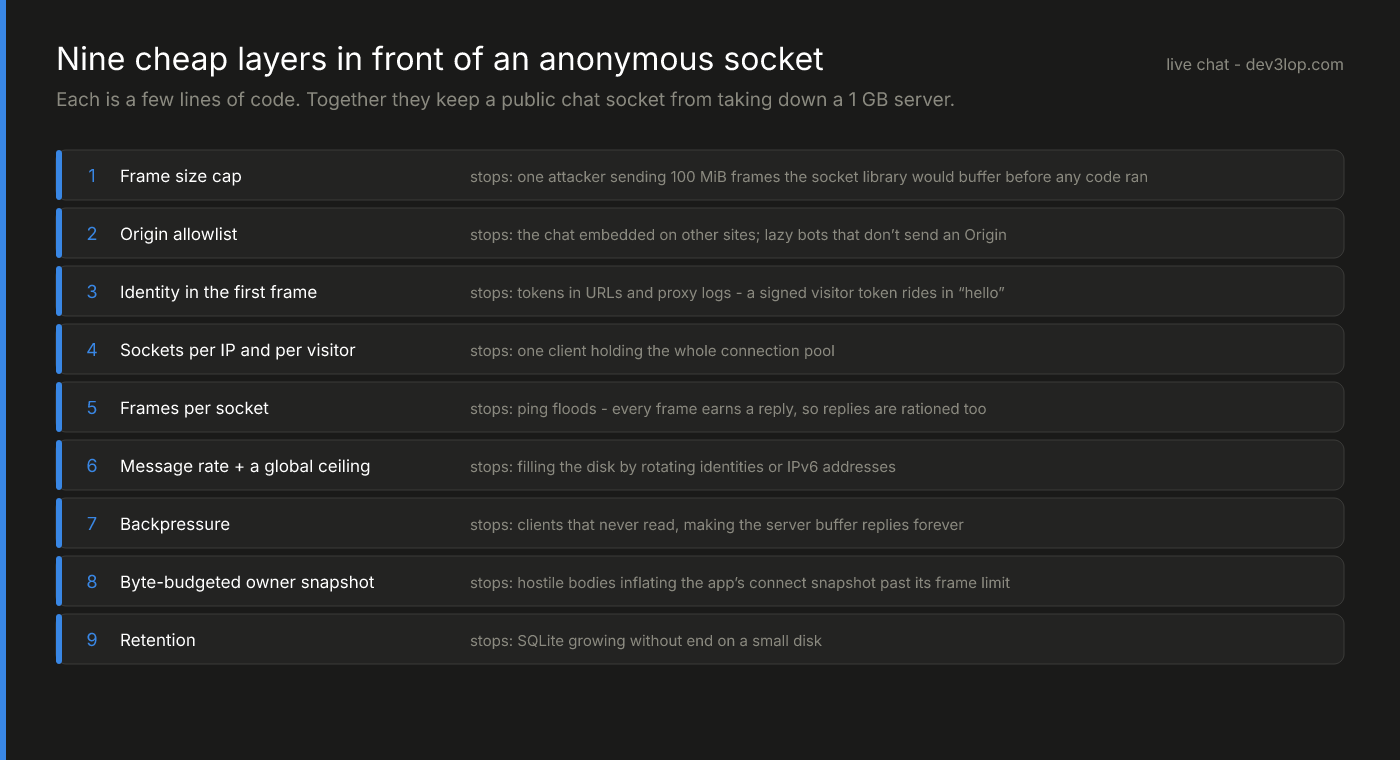
We had most of these on day one. An independent review before launch found the two that mattered most — and both were defaults we never chose:
1. The frame size cap. The popular Node ws library accepts messages up to 100 MiB by default, and it buffers the whole frame before any application code runs. Our handler rejected anything over a few kilobytes — after the library had already allocated it. A handful of parallel connections sending huge frames would exhaust a 1 GB server. The fix is one line on the WebSocket server (maxPayload), set to 64 KiB for every route. We verified it against production: a 200 KiB frame is now refused with close code 1009 before it’s ever buffered.
2. The owner’s snapshot budget. When the desktop app connects, it receives recent conversations in one frame. Visitor messages are attacker-controlled text, and some text gets bigger when JSON-escaped (quotes and backslashes double; many scripts are three bytes per character). Enough of it could push the snapshot past the app’s maximum frame size — and, combined with a client that reset its backoff on connect, trap the app in a once-a-second reconnect loop. The snapshot is now built most-recent-first and stops at a byte budget, and it’s served from an indexed column instead of a scan over every message ever stored.
The rest are individually boring, which is the point:
- Sockets per IP and per visitor, so one client can’t hold the whole connection pool (IPv6 is bucketed by /64, since one host usually owns the prefix).
- Frames per socket. Every frame earns a reply — a pong, an error — so a client can make the server write as fast as it can send. Past a small burst, the socket is closed.
- Message rates per visitor, plus a global ceiling, so rotating identities can’t fill the disk.
- Backpressure. Before writing, the server checks how much it has already queued for that socket; a client that never reads gets dropped instead of buffered forever.
- Retention. Old conversations are pruned on a schedule. A small disk is a finite resource.
None of these needed a new service, a WAF or a queue. They’re a few lines each, and they’re all covered by tests that drive the hub with fake sockets.
The owner door: GitHub sign-in for a desktop app
The desktop app originally authenticated with a long random token pasted from the server’s configuration. It worked, and nobody would want to do it twice. The replacement: Sign in with GitHub — using the OAuth app the server already had for the team chat, with the client secret staying on the server.
The problem with OAuth in a native app is getting the result back to the app. The server can’t redirect to “the app.” It can redirect to a custom URL scheme the app registers in its Info.plist — but any app on the machine can register the same scheme and receive that redirect. That’s exactly what PKCE exists for.
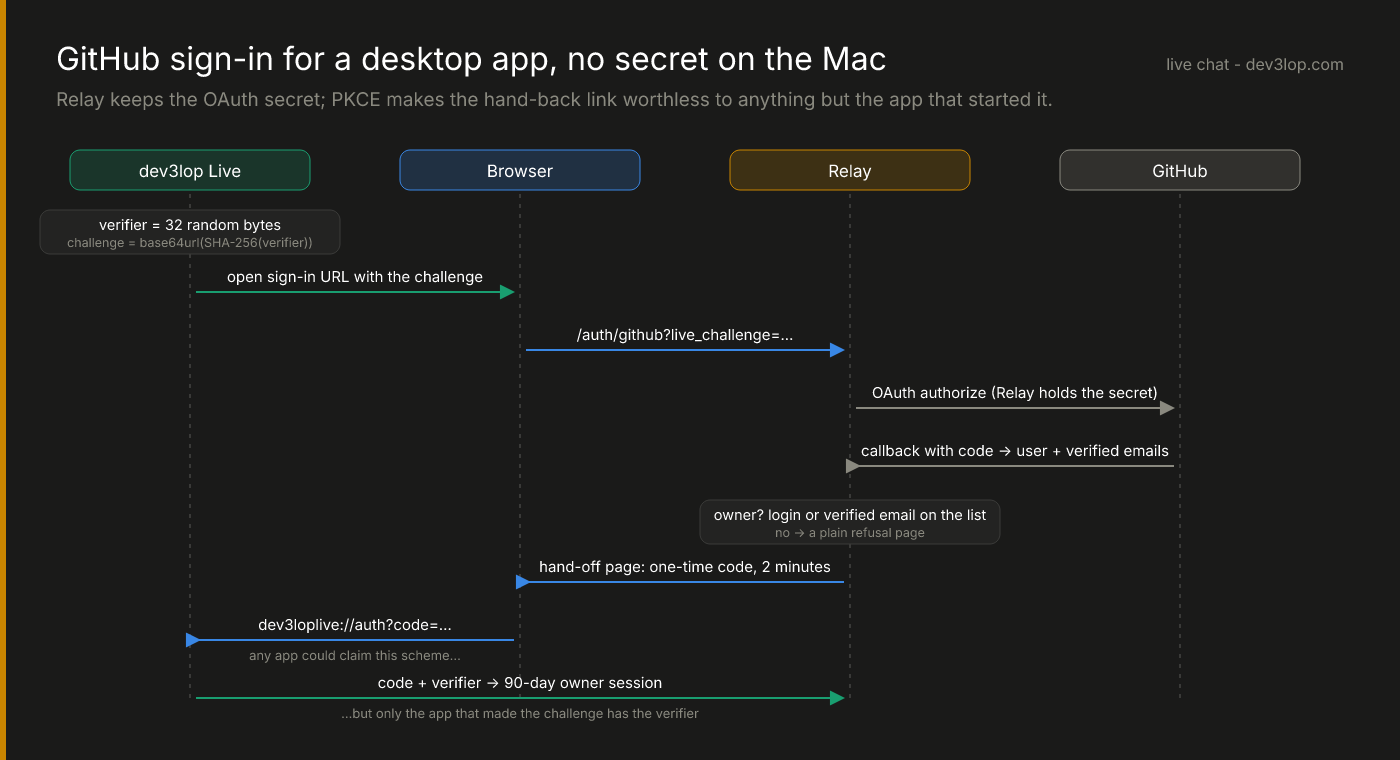
The hero diagram is the full sequence:
- The app makes a random verifier, keeps it in memory, and opens the browser to the server’s GitHub login with only the challenge — the SHA-256 of the verifier.
- The server runs the normal GitHub OAuth dance, secret and all.
- The server checks that this GitHub account is an owner — by login, or by any of the account’s verified email addresses. Unverified addresses never count. Anyone else gets a plain refusal page.
- For an owner, the server issues a one-time code, valid for two minutes, and hands it to the app through the custom scheme.
- The app sends the code and the verifier back. The server checks the verifier hashes to the challenge from step 1, burns the code either way, and returns an owner session.
A malicious app that intercepts the hand-off gets a code it can’t use: it doesn’t have the verifier, and its one attempt burns the code for everyone.
const entry = pending.get(code);
pending.delete(code);                                  // single use, right or wrong
if (!entry || entry.expiresAt <= now) return fail();
if (!timingSafeEqual(sha256b64url(verifier), entry.challenge)) return fail();
if (!stillOwner(entry.login, entry.email)) return fail();
return signOwnerSession(entry);                         // audience-scoped, 90 days
Revocation without a revocation list
The owner session is a signed token scoped to a single audience, so it can’t be replayed against the team chat’s routes. It lasts 90 days — but it’s re-checked against the owner list on every socket connect. Take a login or email off the list on the server and that session stops working the next time the app reconnects. No database of revoked tokens, no push to the client.
The allowlist-by-verified-email detail came from real use: the first sign-in attempt arrived from a different GitHub account than expected, and the refusal page said so, by name. Adding the owner’s verified addresses to the list made “whichever of my accounts I happen to be signed into” just work, without widening access to anyone else.
What this adds up to
Two doors, two postures. The public one assumes hostility and makes every expensive thing — memory, disk, write bandwidth, the owner’s attention — something a stranger can only spend in small, bounded amounts. The private one never lets a secret leave the server and never lets a credential outlive the list that granted it.
That’s the end of the series: the architecture, the C++17 core, the socket client, the native shell, and this. If you’re putting a real-time endpoint in front of the public — or bolting sign-in onto an internal tool — and want a second set of eyes before an attacker provides one, talk to us.