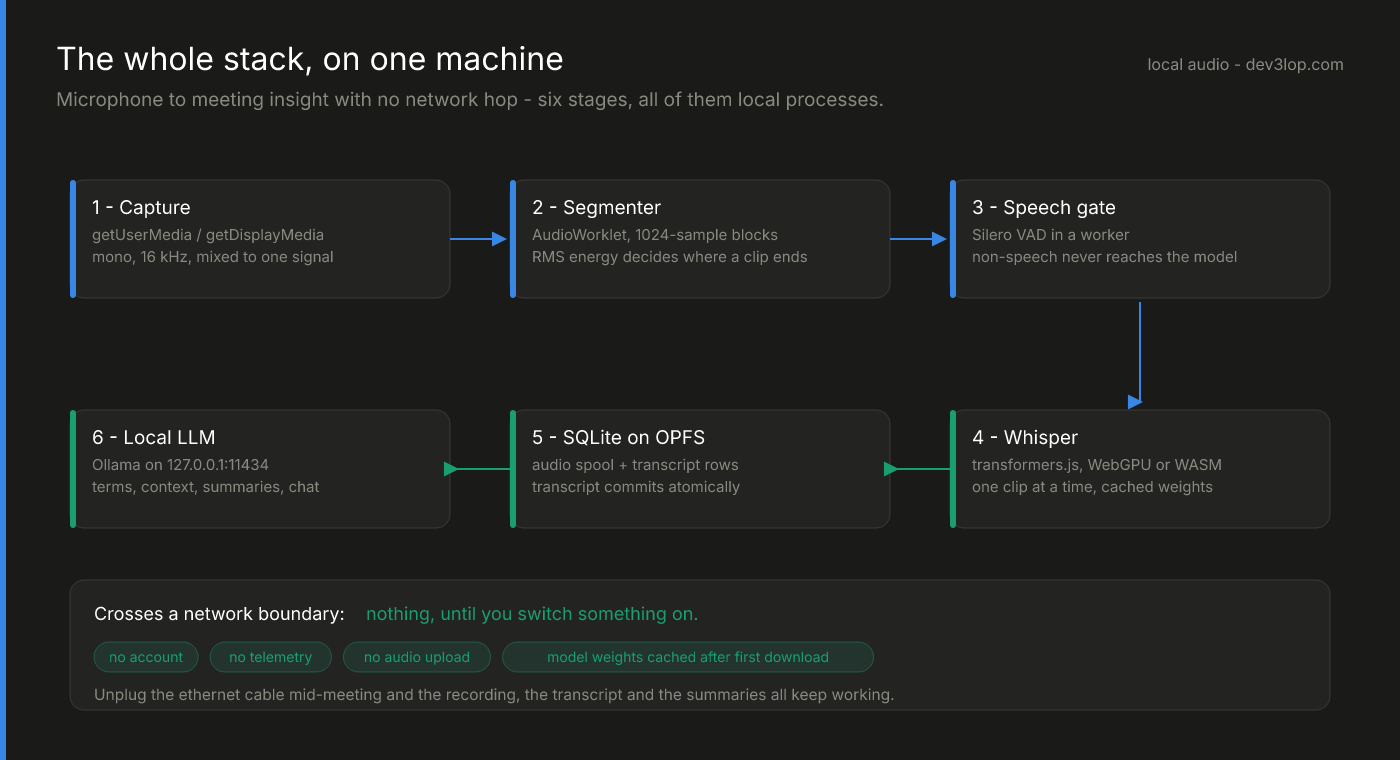
The first four posts in this series got audio into text: the stack, the speech gate, the durable queue, speaker labels. This one is about the part that makes it a workspace rather than a dictation machine — a local model reading the transcript while the meeting is still happening — and why that is a scheduling problem before it is a prompting problem.
The naive version is one line: when new transcript rows arrive, call the model. Ship that and a user in a two-hour meeting watches their fans spin up, their transcription queue back up, and their chat replies arrive ninety seconds late while a 7B model is busy summarizing something they already read.
A laptop running a local model is not a server. It is a machine with one job that actually matters — keep recording — and a second job that is nice to have.
Three lanes and one hard rule
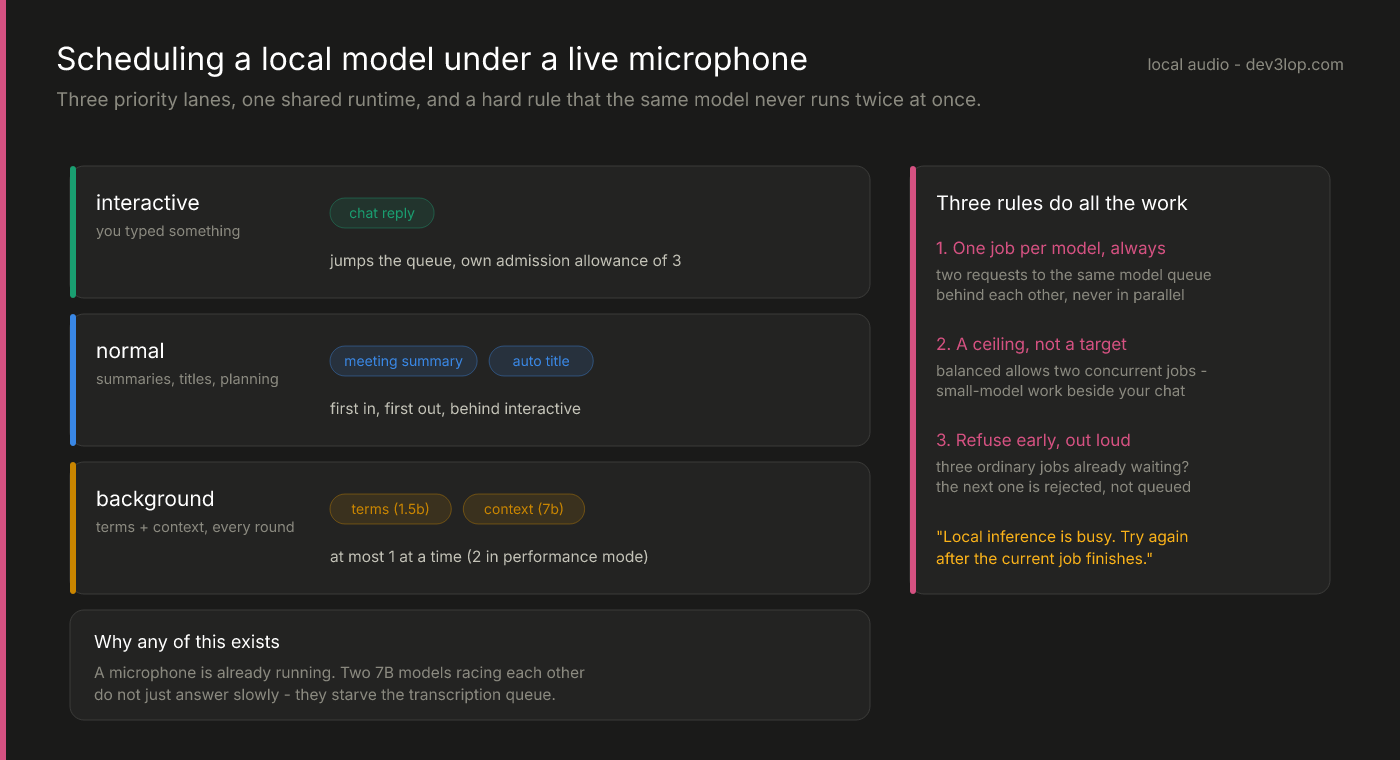
The hero diagram is the scheduler. Every request declares a priority:
- interactive — you typed something and are looking at the cursor.
- normal — summaries, automatic meeting titles, planning.
- background — the two incremental roles that run on their own rounds: terms (a small model, typically
qwen2.5:1.5b, explaining acronyms and jargon) and context (a larger one, typicallyqwen2.5:7b-instruct, extracting the situation and open questions).
Three rules do all the work.
One job per model, always. Two requests to the same model are serialized no matter what mode you’re in. This is the rule people skip, and it’s the most important one: a second concurrent call against the same weights doesn’t get you parallelism, it gets you two requests contending for the same runner and both of them finishing later than either would have alone.
The concurrency number is a ceiling, not a target. In the default balanced mode the limit is two, which exists so a 1.5B model can do background work beside your 7B chat — different models, genuinely different runners.
Refuse early and out loud. If three ordinary jobs are already active or waiting, the next one is rejected with "Local inference is busy. Try again after the current job finishes." Interactive requests get their own separate allowance of three. An unbounded queue on a machine this size isn’t a queue, it’s a promise you can’t keep — and a user who sees an immediate “busy” learns the system’s limits, while a user watching a spinner learns to distrust it.
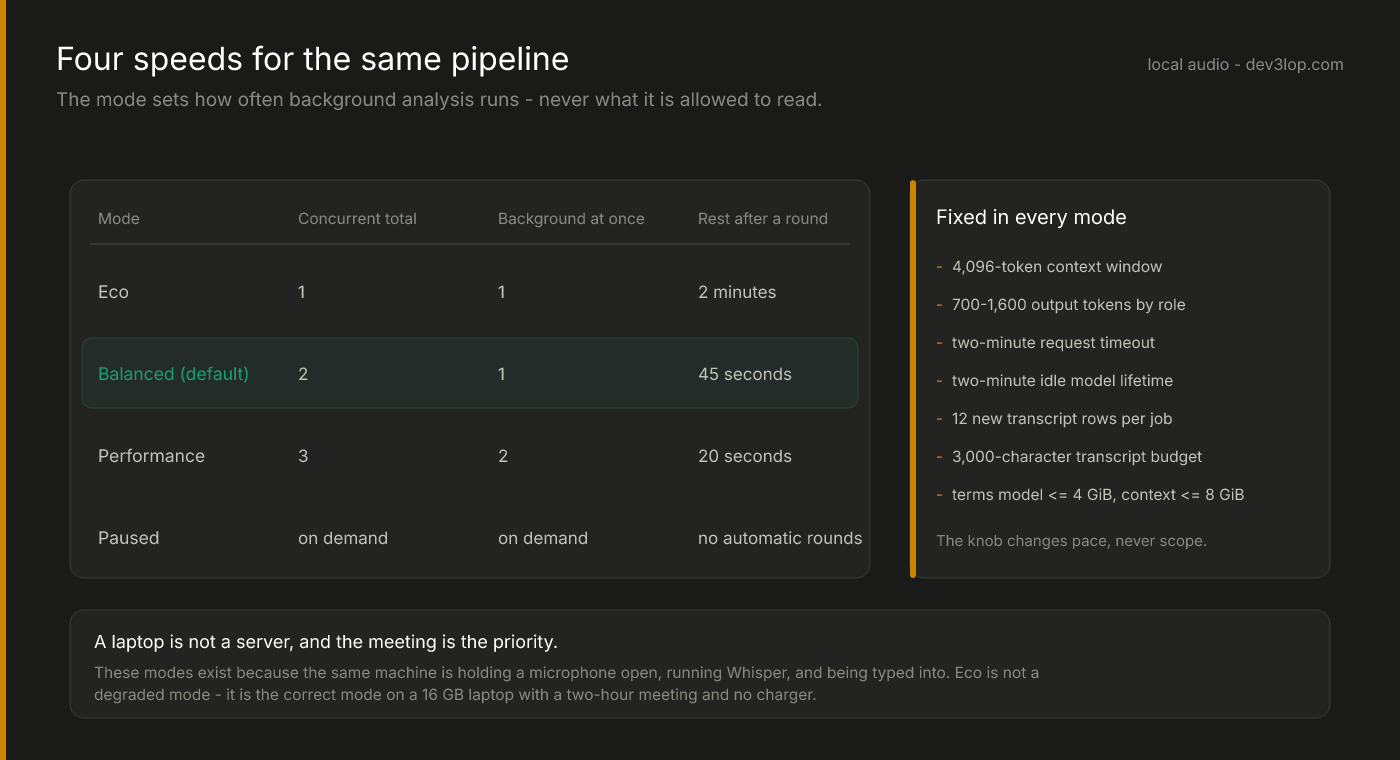
The mode is a user-facing setting, and it controls exactly one thing: pace. Eco runs a round every two minutes with one request at a time. Balanced — the default — allows two concurrent requests and rests 45 seconds. Performance allows three, two of them background, and rests 20 seconds. Paused does nothing until you ask.
What the mode does not touch is scope, and that column on the right is fixed everywhere: a 4,096-token context window, 700 to 1,600 output tokens depending on the role, a two-minute hard request timeout, a two-minute idle model lifetime, twelve new transcript rows per job inside a 3,000-character budget, and eligibility caps of 4 GiB on disk for the terms model and 8 GiB for the context model.
Eco is not a degraded mode. On a 16 GB laptop, in a two-hour meeting, on battery, eco is the correct mode — and framing it that way in the UI is the difference between a setting people use and a setting people resent.
Five reasons to stop thinking
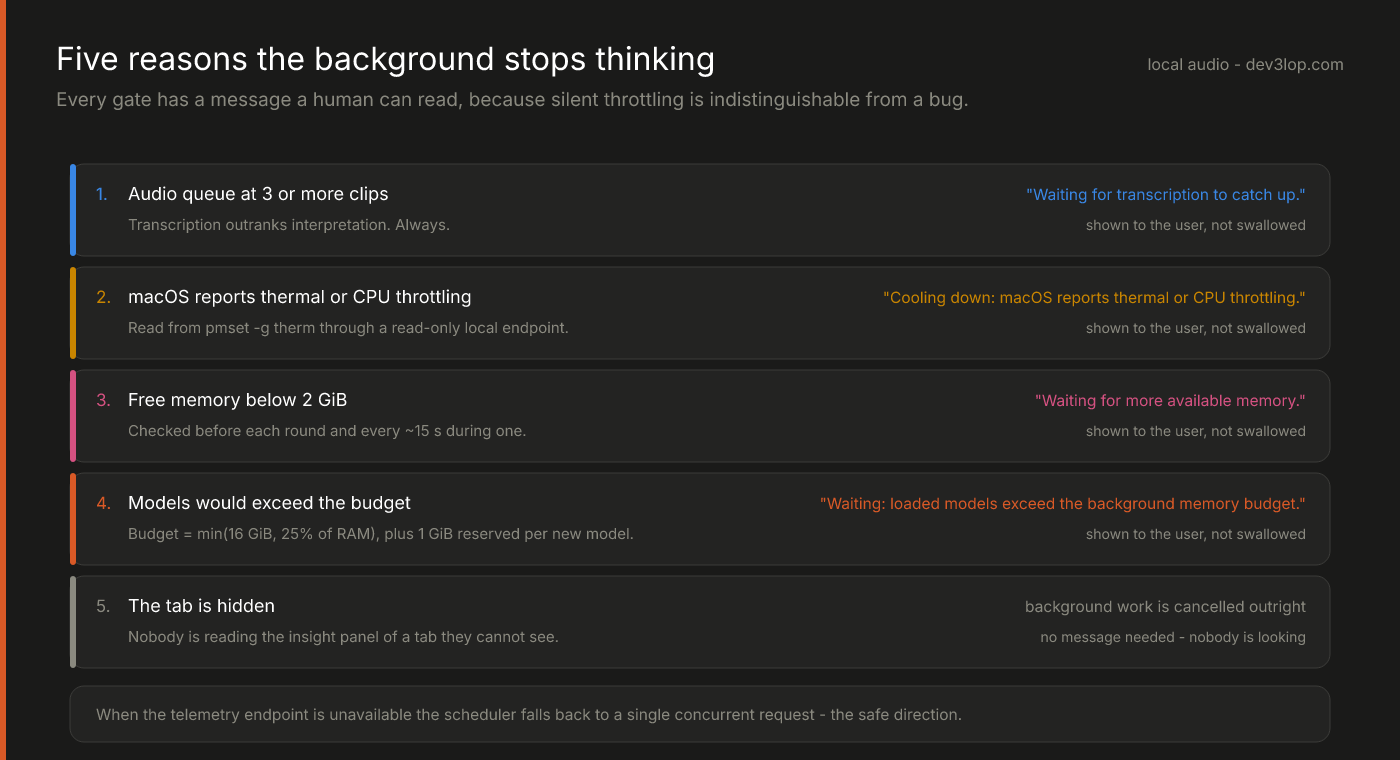
Rate limiting is not enough on a machine you don’t own. The scheduler checks real conditions before each round and roughly every 15 seconds during one:
- Three or more clips in the audio queue. Transcription outranks interpretation, always. This is the same gate the spool post shows as a dashed line on the backlog chart.
- Thermal or CPU throttling. Read from
pmset -g thermthrough a read-only local endpoint. The companion does not measure temperature, fan speed or battery draw, and doesn’t claim to — it reads the warning the OS is already publishing. - Free memory below 2 GiB.
- Model budget exceeded. The allowance is the smaller of 16 GiB or 25% of system RAM, computed from Ollama’s actual resident allocation via
/api/psplus a 1 GiB context reserve for each model not yet loaded. It is an estimate used to decide whether to start work, not an enforced OS limit — and saying that plainly matters more than sounding impressive. - The tab is hidden. Nobody is reading the insight panel of a tab they can’t see, so background work is cancelled rather than paused.
Every one of these has a message a human can read, because silent throttling is indistinguishable from a bug. “Waiting for transcription to catch up” is a system explaining itself. A spinner that never resolves is a support ticket. And when the telemetry endpoint isn’t available at all, the scheduler falls back to a single concurrent request — the safe direction, which is the only direction an unknown environment justifies.
The scheduler also doesn’t touch what it doesn’t own: it never restarts Ollama, never unloads models another application loaded, and never changes global settings. Other tabs and other apps using the same daemon are outside its view, and pretending otherwise would make its budget arithmetic a lie.
Make the model cite the transcript
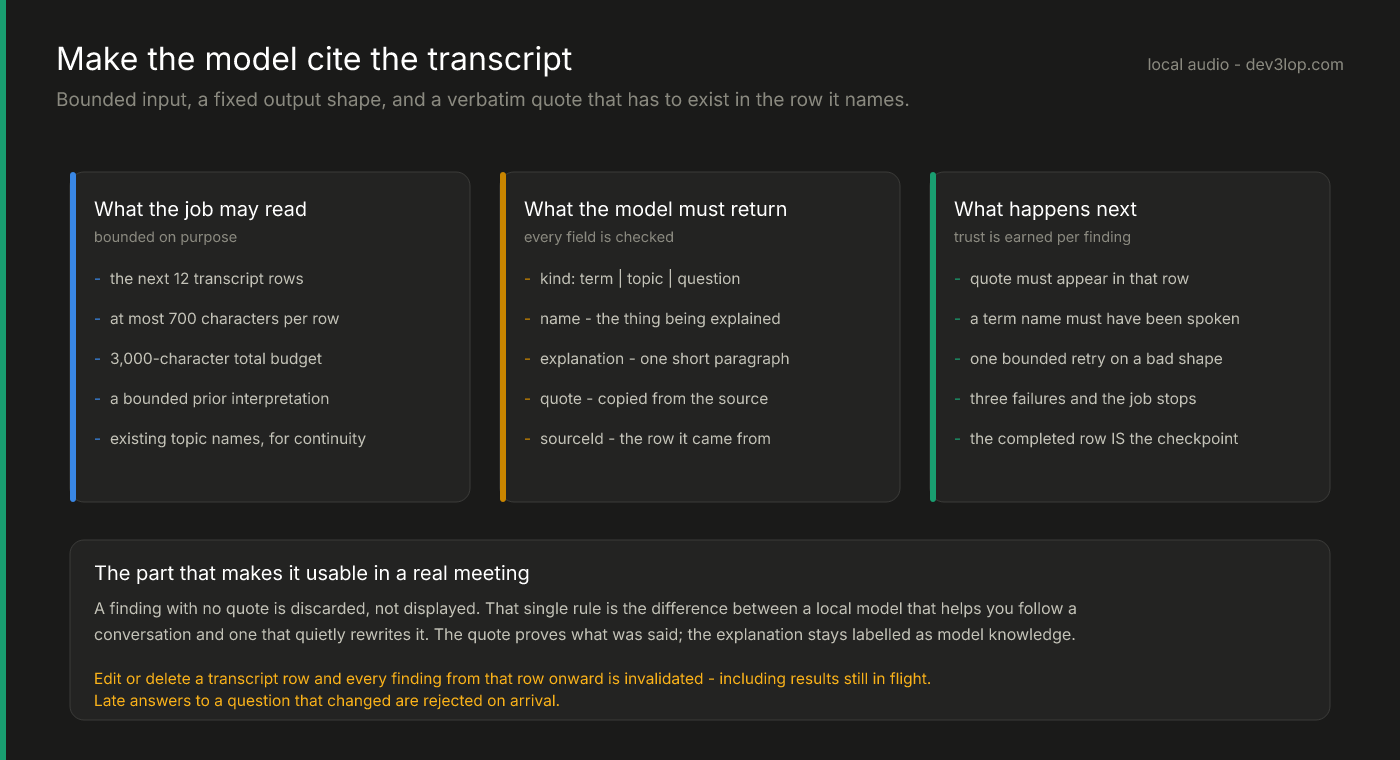
Everything above buys the model a slice of a busy machine. This is what makes the slice worth spending.
Each background job reads the next twelve transcript rows, at most 700 characters each inside a 3,000-character budget, plus a bounded prior interpretation for continuity. It must return findings in a fixed shape: a kind, a name, a short explanation, a verbatim quote, and the id of the row that quote came from.
Then the checks run. The quote has to actually appear in the cited row. A term name has to have been spoken in the source it claims. Lengths are bounded. A malformed response gets one bounded verification retry; after three failed attempts the job backs off and stops on its own rather than grinding.
A finding with no quote is discarded, not displayed. That single rule is the difference between a local model that helps you follow a conversation and one that quietly rewrites it. The quote establishes what was said; the explanation stays labelled as unverified model knowledge, because the model’s definition of a term is its own prior, not evidence from your meeting.
The persistence model is equally blunt: the completed database row is the checkpoint, so result and progress commit atomically — the same instinct as the transcript commit. An interrupted job resumes after its lease expires. Edit or delete a transcript row and every finding from that row onward is invalidated, including results still in flight, which are rejected on arrival. A summary of a sentence you corrected five minutes ago is worse than no summary.
The general lesson
Most of this has nothing to do with audio. Any time you put a language model on a machine that is also doing real-time work for a human, you inherit the same four questions, and the architecture is the answer to them:
- What is allowed to run at once, and what is serialized? (Same-model work is always serial. Everything else negotiates.)
- What does the system refuse, and how loudly? (Early rejection with a readable message beats an unbounded queue every time.)
- What real conditions pause it? (Queue depth, memory, thermal state, whether anyone is even looking.)
- What must the output prove before you show it? (Here: a verbatim quote from a row it names.)
Answer those four and a local model becomes a background service. Skip them and it becomes the reason someone’s laptop is hot.
We build this kind of thing — on-device pipelines, local inference, and the data engineering underneath both. If you have a workload the cloud isn’t allowed to see, it’s a conversation worth having.
Series: the whole stack · the speech gate · the durable queue · speaker diarization · this post