The owner side of our live chat desk is a Mac app that holds one WebSocket open for hours. That sounds like the easy part of a chat app. It isn’t. A laptop closes its lid mid-sentence, hops Wi-Fi networks, sleeps through a server deploy, and wakes up on a different IP — and in most of those cases nobody tells the socket. No close frame, no FIN, just silence.
The model half of the app is portable C++17 and knows nothing about networking. This post is the other half: the socket client, and the handful of rules that make it boring.
Don’t bring a WebSocket library
The first decision was not to vendor a C++ WebSocket library. macOS already ships a good client in NSURLSessionWebSocketTask, and using it means TLS, HTTP proxies, the system trust store and IPv6 all behave exactly like every other app on the machine, with zero dependencies. The cost is Objective-C — which C++ can call directly from an .mm file.
The shape is a plain C++ class with a pointer-to-implementation. The public header has no Objective-C in it at all:
class LiveSocket {
 public:
  enum class State { Idle, Connecting, Open, Retrying, Unauthorized };
  std::function<void(const std::string& frame)> onFrame;
  std::function<void(State state, int retryInSeconds)> onState;

  void connect(const std::string& url, const std::string& ownerSession);
  void send(const std::string& text);
  void reconnectNow();
  void stop();
 private:
  struct Impl;                 // Objective-C lives only in the .mm
  std::unique_ptr<Impl> impl_;
};
Inside the .mm, Impl is a C++ struct that holds Objective-C objects — the session, the task, timers — as ordinary members. Under ARC that just works: the compiler retains and releases them with the struct’s lifetime. The session is created with the main queue as its delegate queue, so every callback lands on the main thread and the rest of the app never thinks about locks.
A state machine, not a pile of callbacks
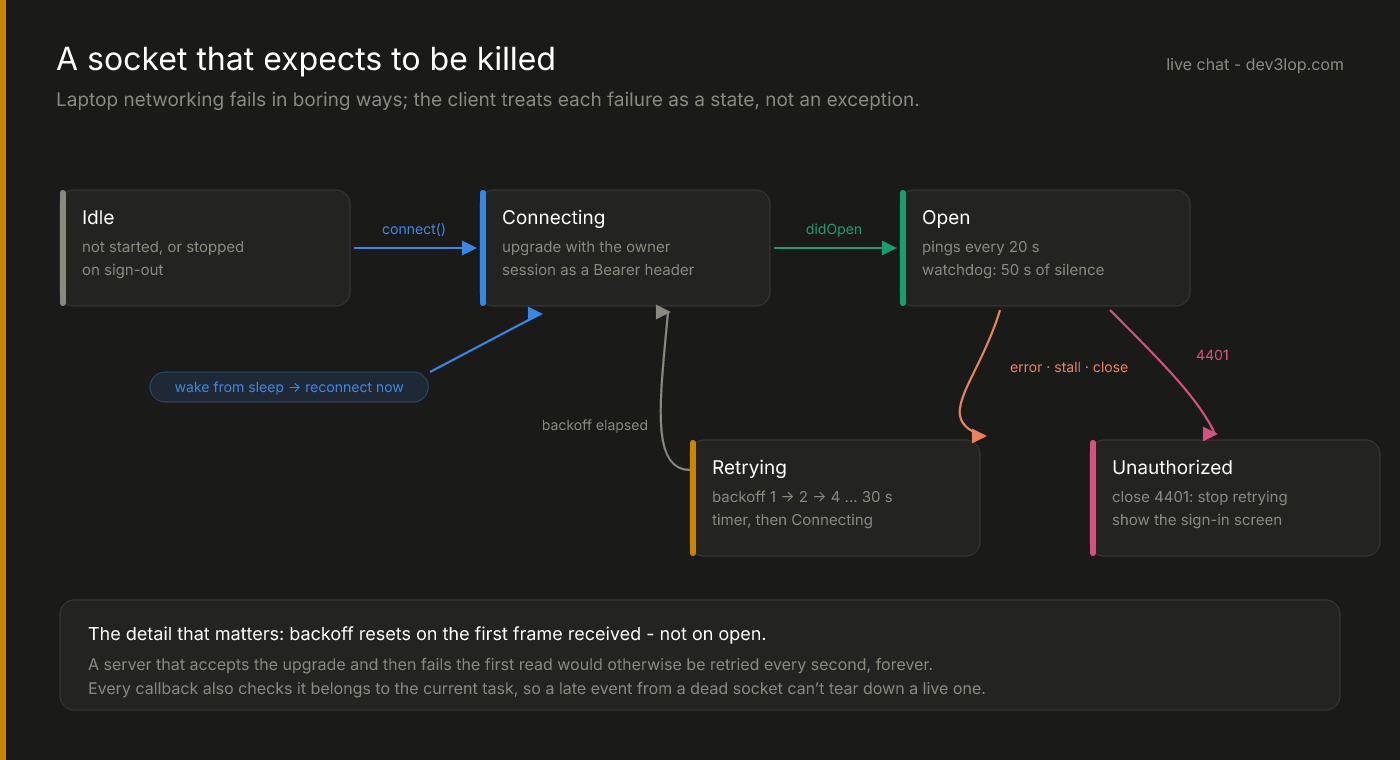
The hero diagram is the whole client. Every event from the OS maps to a transition, and the UI subscribes to one thing — the state — to render “Connected”, “Reconnecting in 4s…” or the sign-in screen.
Four rules keep it honest.
1. Every callback checks it’s still current
NSURLSession callbacks arrive asynchronously and can arrive late: a receive failure for a socket you already replaced, a completion for a task you cancelled. If a late failure from connection #3 is allowed to run the “drop and reconnect” path, it will tear down healthy connection #4. So every block captures the task it belongs to and bails if it isn’t the current one:
[t receiveMessageWithCompletionHandler:^(NSURLSessionWebSocketMessage* msg, NSError* err) {
  dispatch_async(dispatch_get_main_queue(), ^{
    Impl* impl = d.owner;
    if (!impl || impl->task != t) return;   // stale task from a previous connection
    if (err) { impl->closed(t.closeCode); return; }
    impl->lastFrameAt = [NSDate date];
    impl->attempt = 0;                      // see rule 3
    if (impl->self->onFrame) impl->self->onFrame(std::string(msg.string.UTF8String ?: ""));
    impl->receive(t);                       // keep the read loop going
  });
}];
2. Some closes mean “stop”
Most disconnects deserve a retry. One doesn’t. When the server rejects the owner’s session it closes with an application code (we use 4401), and retrying forever would just hammer the server with a credential that will never work. That code moves the client to Unauthorized, which the app renders as its GitHub sign-in screen.
There’s a race hiding here: when the server closes, the pending receive fails — sometimes before the didCloseWithCode delegate fires. Treating the receive error as a generic drop would miss the 4401 and start retrying. The fix is to read the close code off the task in both paths, so whichever callback wins, it sees the same answer.
3. Backoff resets on a received frame — not on open
Reconnects back off exponentially: 1, 2, 4, 8… capped at 30 seconds. The obvious place to reset the counter is “the socket opened.” That’s wrong, and an independent review of this code caught it: a server that accepts the upgrade and then fails the first read — for example because the first message is too large for the client (more on that below) — would reset the backoff on every attempt and get hammered once a second, forever. The counter now resets only when a frame actually arrives.
4. Know your framework’s limits
NSURLSessionWebSocketTask refuses incoming messages larger than 1 MB by default. The owner app’s first frame is a snapshot of recent conversations, and a busy month can outgrow that. The failure mode is nasty: the receive errors out, which looks exactly like a dropped connection, which triggers a reconnect, which sends the same snapshot again. The client raises the limit explicitly, and the server caps the snapshot by bytes, not by count — both sides of the same bug, fixed on both sides.
When the lid closes
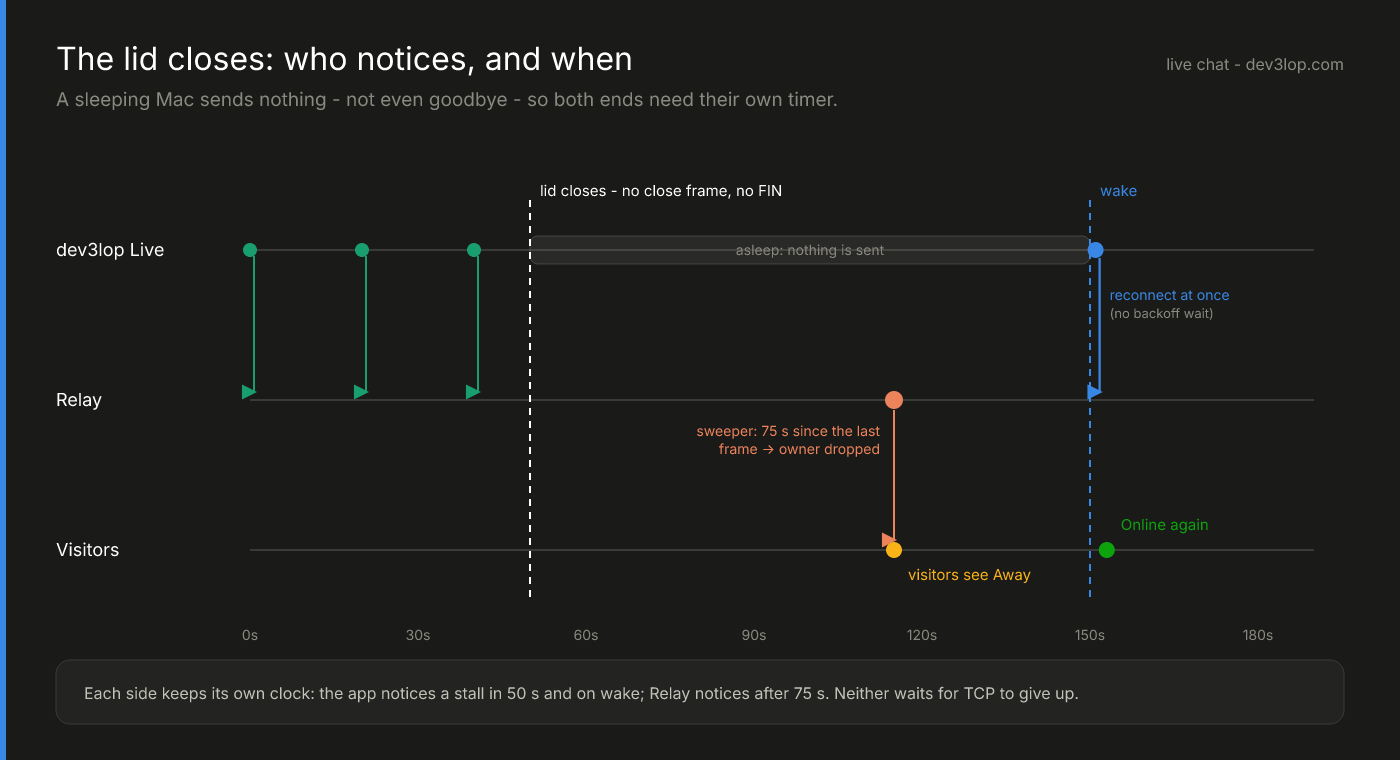
A sleeping Mac is the classic half-open connection: the TCP socket on the server looks alive for minutes, sometimes hours. Waiting for the kernel to notice is not an option when a website is telling visitors a human is available. So each side keeps its own clock:
- The app pings every 20 seconds and runs a watchdog: if nothing has arrived for 50 seconds — not even a pong — it assumes the connection is dead and drops it itself.
- The server sweeps every 15 seconds and closes any owner socket that’s been silent for 75. That flips visitors to “away” within about a minute of the lid closing, which is the whole point.
- On wake, the app reconnects immediately. macOS posts
NSWorkspaceDidWakeNotification; the client treats it as “skip the backoff, reconnect now.” The owner is back online a second or two after opening the lid, without waiting out a 30-second timer that started while the machine was asleep.
The sweeper and the watchdog use different numbers on purpose. The app’s is shorter so it notices first and heals itself; the server’s is longer so a slow network doesn’t flap the owner offline between pings.
Proving it
The test that convinced us wasn’t a unit test. With the real app connected, we killed the server process, watched the app go to “Reconnecting in 2s…”, “…4s…”, and started the server again. The app reconnected on its own, re-sent its Online switch, and the public status endpoint said online: true about six seconds after the server came back. Visitors with the widget open watched the dot go amber and back to green without reloading anything.
That’s the bar for a socket on a laptop: every failure is a state you can see, and every state has a way home.
The next post is the rest of the Mac app — built with a Makefile instead of Xcode, drawing a Slack-style room with plain AppKit, and chasing down why notifications silently vanished: a native macOS app without Xcode. If your product has a long-lived connection that falls over whenever someone’s laptop does, we can help make it boring.