Most “live chat” on the web is a lie told politely. A bubble in the corner says We’re online! while the only thing online is a vendor’s server, a queue, and a bot that will ask for your email. We wanted the opposite: a chat on every page of dev3lop.com that says “Hey, I’m online” only when a person is sitting at a desk with the app open — and says, just as plainly, “I’m away, leave me a message, I usually reply within 15 minutes” the rest of the time.
That one requirement — the status has to be true — shaped everything else. This post is the map. The four that follow are the hard parts: a dependency-free C++17 core, WebSockets from C++ that survive a sleeping laptop, a native macOS app built without an Xcode project, and securing a public socket and a desktop GitHub sign-in.
Three pieces, one direction of trust
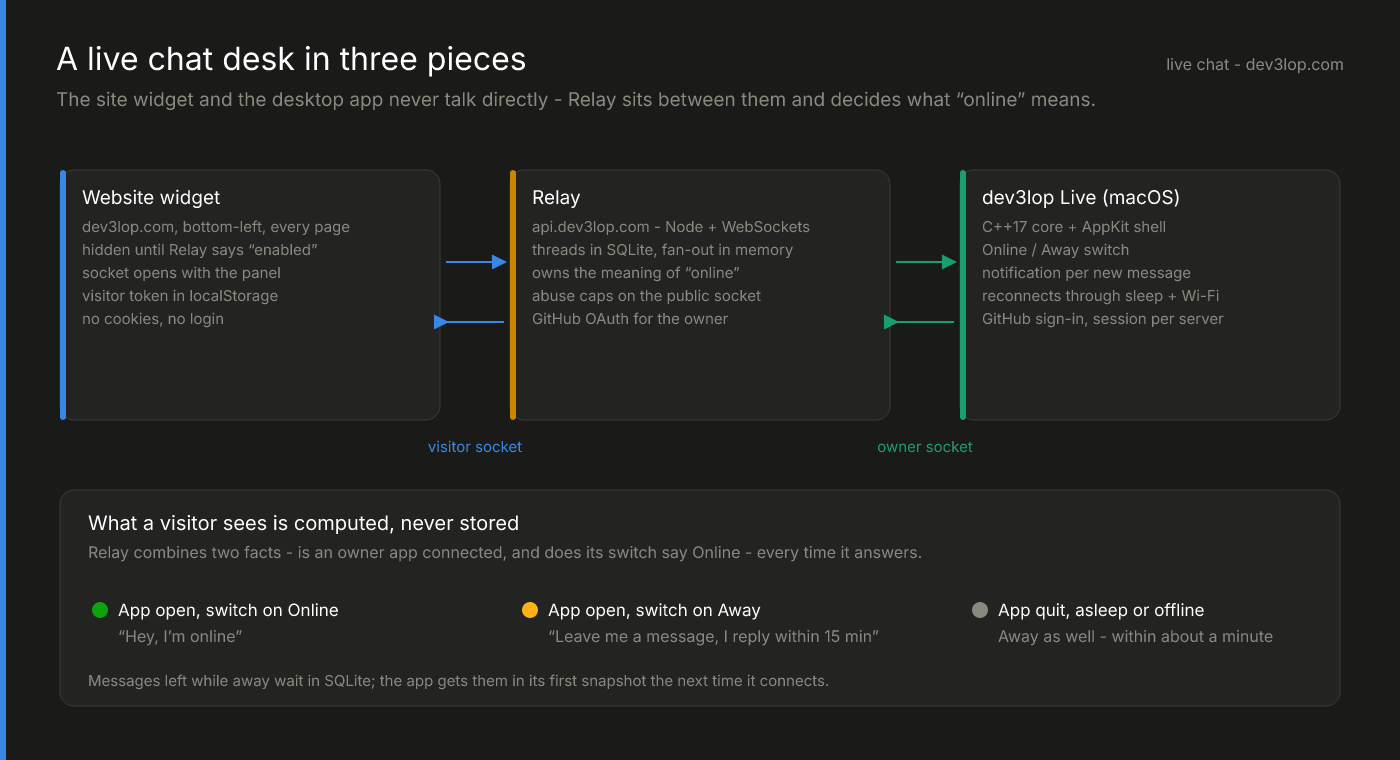
The hero diagram above is the whole system:
- The website widget. A launcher in the bottom-left of every page, and a small panel that opens from it. It is plain DOM and a few kilobytes of TypeScript, not an iframe from someone else’s domain.
- Relay. Our existing Node service on its own subdomain — the same process that runs our team chat rooms — with one new module for live chat. It holds conversations in SQLite and fans messages out over WebSockets.
- dev3lop Live. A native macOS app: a portable C++17 core that owns the model and the wire protocol, wrapped in an AppKit shell that draws the window, posts notifications and signs in with GitHub.
The widget and the app never talk to each other. Everything goes through Relay, over two different sockets with two different trust models: an anonymous visitor socket that anyone on the internet can open, and an authenticated owner socket that only the desktop app can. Keeping them separate is what lets the public side be boring and paranoid while the owner side stays simple.
What “online” actually means
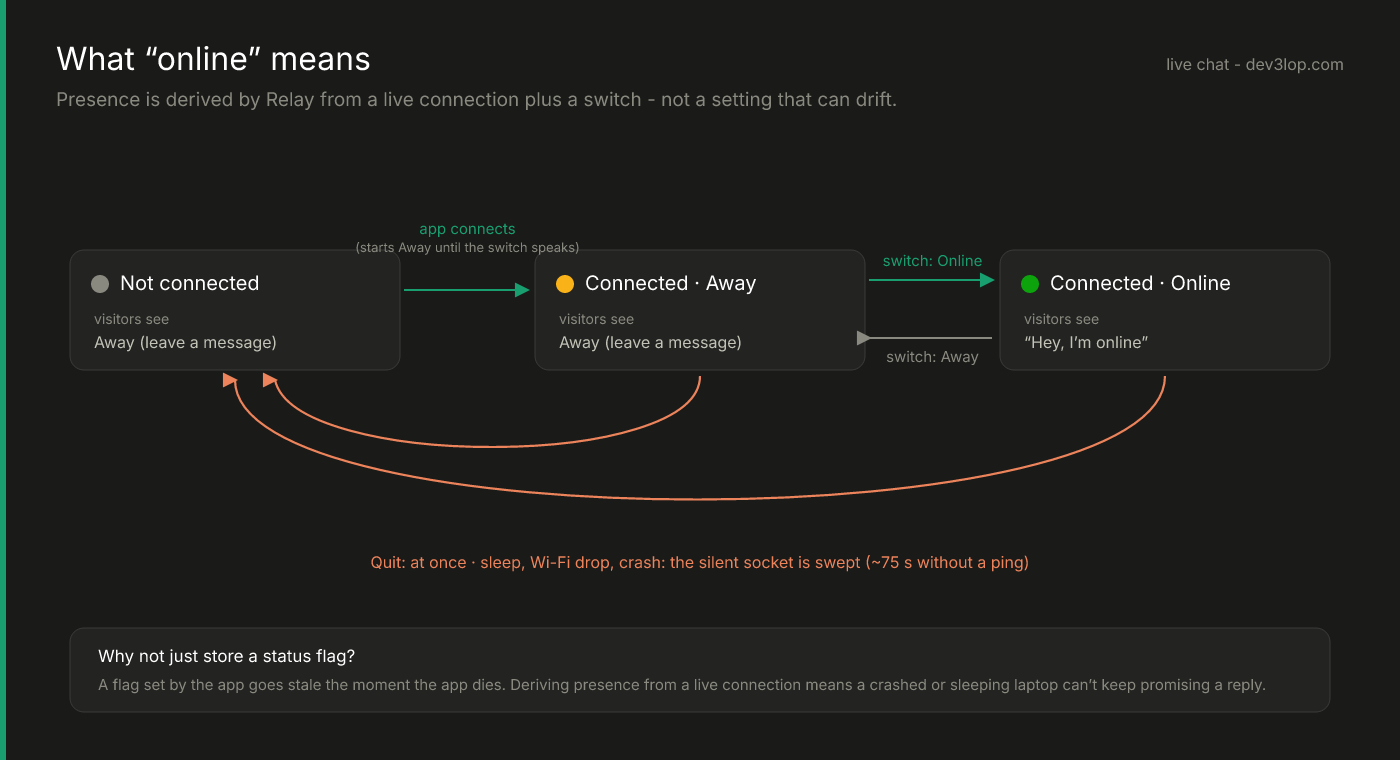
The tempting design is a status field: the app sets online = true, the website reads it. It fails in exactly the case that matters. The laptop lid closes, the app never gets to say goodbye, and the flag keeps promising a reply that isn’t coming.
So Relay never stores “online.” It computes it from two facts every time anyone asks:
- Is at least one owner app connected right now?
- Did the most recent Online/Away switch say Online?
Both have to be true. Quit the app and the answer changes instantly, because the socket closes. Close the lid and it changes within about a minute, because the app stops pinging and a sweeper drops sockets that have gone quiet (the exact dance is in the socket post). There is no path by which a crashed or sleeping machine keeps saying “Hey, I’m online.”
The app also starts every connection as Away and only goes Online when it sends its switch state. A server restart can’t strand a stale value, because the switch is re-sent on every connect.
The protocol, at the level that matters
Both sockets speak small JSON frames. On the visitor side:
| Visitor sends | Relay answers |
|---|---|
hello with an optional token and the current page | welcome with a token, the online verdict and this visitor’s history |
message with the text (and an optional email) | the stored message, echoed to every open tab of that visitor |
ping | pong |
And on the owner side, the app gets a hello snapshot of recent conversations when it connects, then live message, visitor, status and photo frames; it sends status (the switch), reply and ping.
Two details carry more weight than they look:
The owner’s own replies come back as echoes. The app does not draw a reply when you press Return — it draws it when Relay says it was stored. What is on your screen is what persisted, and a second Mac signed into the same account stays in sync for free.
The visitor’s identity is a token Relay mints, not an account. No cookies, no login, nothing to consent to. The token lives in localStorage and rides inside the first frame (never the URL, so it never lands in a proxy log). A visitor who leaves a message and comes back tomorrow, on any page, gets their thread — including your reply — the moment the widget reconnects.
The widget stays off the critical path
A chat bubble is not worth a slower site, so the widget is built to cost nothing until it’s used:
- It renders hidden. After the page is idle, it makes one small status request. If Relay is unreachable or live chat is switched off, it stays hidden — you never offer a chat nobody can answer.
- The WebSocket opens only when someone opens the panel — or, for a visitor who already has a conversation, quietly in the background so a reply can light up a badge on whatever page they’re on.
- It survives client-side navigation. The site uses view transitions; the widget is marked to persist across them, so an open conversation (and its socket) doesn’t reset when the visitor clicks to another page.
- Everything is rendered with
textContent. The only HTML the widget creates from message text is a link, and only forhttp/httpsURLs in replies.
Messages left while you’re away
“Leave me a message” has to mean the message is still there tomorrow. Relay writes every message to SQLite before it fans it out, and the owner app’s hello snapshot is built from the database, not from memory. Open the app in the morning and last night’s questions are in the sidebar with unread badges, in the order they arrived.
That ordering hid one of the better bugs in the project. Messages were first sorted by their ISO timestamp. A test that sent a question and a reply back-to-back failed intermittently: both landed in the same millisecond, the tie-breaker was a random id, and the reply occasionally sorted above the question. The fix was to order by SQLite’s insertion rowid — insertion order is conversation order — and keep the timestamp for display only. Small, but it’s the kind of thing that makes a chat log look haunted.
Why build it at all
A hosted widget would have been an afternoon. It also would have meant a third-party script on every page, visitor messages stored on someone else’s servers, a pricing page that scales with traffic, and — the real deal-breaker — a status light that the vendor controls rather than one wired to a person.
Building it ourselves took a small Node module, a few hundred lines of TypeScript for the widget, and a native app whose core is portable C++. The rest of this series is the parts of that app worth stealing: the C++17 core, the socket client, the no-Xcode native shell, and how the public side stays standing.
If you want something like this wired into your own product — a real-time channel where the data stays yours — that’s the kind of engineering we do.