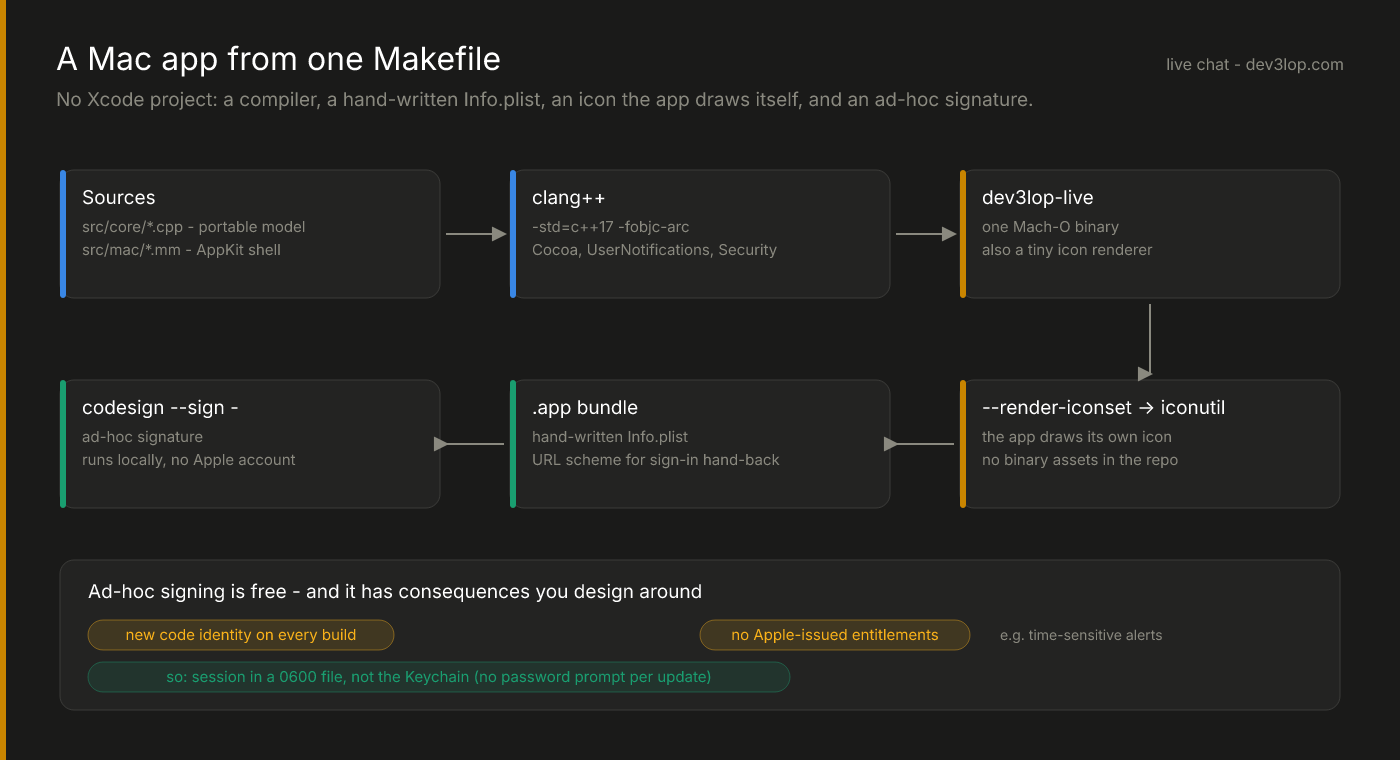
The app on the owner’s side of our live chat desk is a native Mac app — a real window, notifications, a Dock badge, a sign-in flow — and there is no Xcode project anywhere in the repository. It builds with make, from the command-line tools, in a few seconds. This post is about the shell around the C++17 core: how the bundle gets built, what cutting Xcode out actually costs, how a Slack-style room comes out of plain AppKit, and the afternoon we spent convinced notifications were broken.
A .app is just a folder
A Mac app is a directory with a known shape: Contents/Info.plist, a binary in Contents/MacOS, resources in Contents/Resources. Xcode builds that shape for you, but so can eight lines of Make:
$(STAMP): $(BIN) resources/Info.plist
	rm -rf "$(APP)" $(BUILD)/AppIcon.iconset
	mkdir -p "$(APP)/Contents/MacOS" "$(APP)/Contents/Resources"
	cp resources/Info.plist "$(APP)/Contents/Info.plist"
	cp $(BIN) "$(APP)/Contents/MacOS/$(BIN_NAME)"
	$(BIN) --render-iconset $(BUILD)/AppIcon.iconset
	iconutil -c icns $(BUILD)/AppIcon.iconset -o "$(APP)/Contents/Resources/AppIcon.icns"
	codesign --force --sign - --timestamp=none "$(APP)"
The binary itself is one clang++ invocation over the C++ core (.cpp) and the Objective-C++ shell (.mm), with ARC on and a handful of system frameworks linked. The Info.plist is hand-written and short: bundle id, version, minimum OS — and a URL scheme, which comes back in the sign-in post.
The line people ask about is --render-iconset. The icon is drawn by the app’s own code — a rounded tile, a gradient speech bubble, a green “online” dot, all NSBezierPath — and the binary has a mode that renders it at every size an .iconset needs. The repo carries no binary art, the icon is reviewable as code, and changing the brand color is a one-line diff.
What ad-hoc signing costs
codesign --sign - is an ad-hoc signature: good enough to run on your own Mac, no Apple developer account required. It’s the right trade for an internal tool. It also has two consequences you design around rather than discover later.
Every build is a new identity. The Keychain ties an item to the exact code that created it. Our first version stored the owner’s session there — and after every update macOS asked for the login password before the new build could read its own secret. For an app you update often, that’s a non-starter. The session now lives in a private file instead: a per-server file under Application Support, directory mode 0700, file created 0600 from its first byte and swapped in with an atomic rename. That’s the same posture as a CLI token file, and the session is revocable server-side at any moment, which matters more than where it sleeps.
No Apple-issued entitlements. Anything gated on a provisioning profile is off the table. The one we missed was time-sensitive notifications — macOS quietly downgrades them (“missing authorization”), so a Focus mode still wins. More on that below.
AppKit gotchas you only meet without templates
Xcode’s templates hide a few defaults that a hand-built app has to supply:
- No Edit menu, no ⌘C / ⌘V. Text fields get copy and paste from menu items wired to the responder chain. Without an Edit menu, pasting into the reply box silently does nothing. Six
addItemWithTitle:calls fix it. - Closing the window isn’t quitting. For a presence app, it shouldn’t be: the window hides, the socket stays up, and you stay “online.” Quit is the explicit way to go away, and the menu item says so.
- Auto Layout priorities are a two-way street. Our redesigned window launched at 430 points wide — below its own minimum. The culprit was the reply field: its natural width was held at a priority above
NSLayoutPriorityWindowSizeStayPut, so the window shrank to fit the field. Dropping the field’s horizontal hugging and compression resistance to low put the window back in charge.
A Slack-style room in plain AppKit
The first version of the window was functional and forgettable. The second borrows the layout everyone already knows from Slack, because familiarity is a feature in a tool you glance at:
- A fixed dark sidebar (it stays dark in light mode, like Slack’s): the workspace name, an Online/Away switch with a one-line “what visitors see,” a list of visitors with color-hashed initial avatars, a violet selection pill and magenta unread counts, and your account in the footer.
- A full-size content view with a transparent titlebar, so the sidebar runs up under the traffic lights.
- A conversation pane that follows light and dark mode, with the familiar rhythm: a centered day pill, then groups of messages under one avatar, bold name and faint time.
The transcript isn’t a table of cells — it’s a single NSTextView, which gives text selection across messages and link clicking for free. Avatars and the “Today” pill are NSTextAttachment images; indentation is paragraph style. Grouping is one condition:
const bool newGroup = !groupOpen || m.from != lastFrom || at - lastAt > 5 * 60 * 1000;
if (newGroup) {
  NSTextAttachment* face = [NSTextAttachment new];
  face.image = mine ? ownerFace : visitorFace;
  face.bounds = NSMakeRect(0, -12, avatar, avatar);
  // …then a tab to the gutter, the bold name, and the time in a lighter weight
}
// every body paragraph is indented to the same gutter, so a burst reads as one block
Your own messages carry your photo — which you pick from the app, and which the website’s chat header then shows to visitors too.
The notifications that weren’t broken
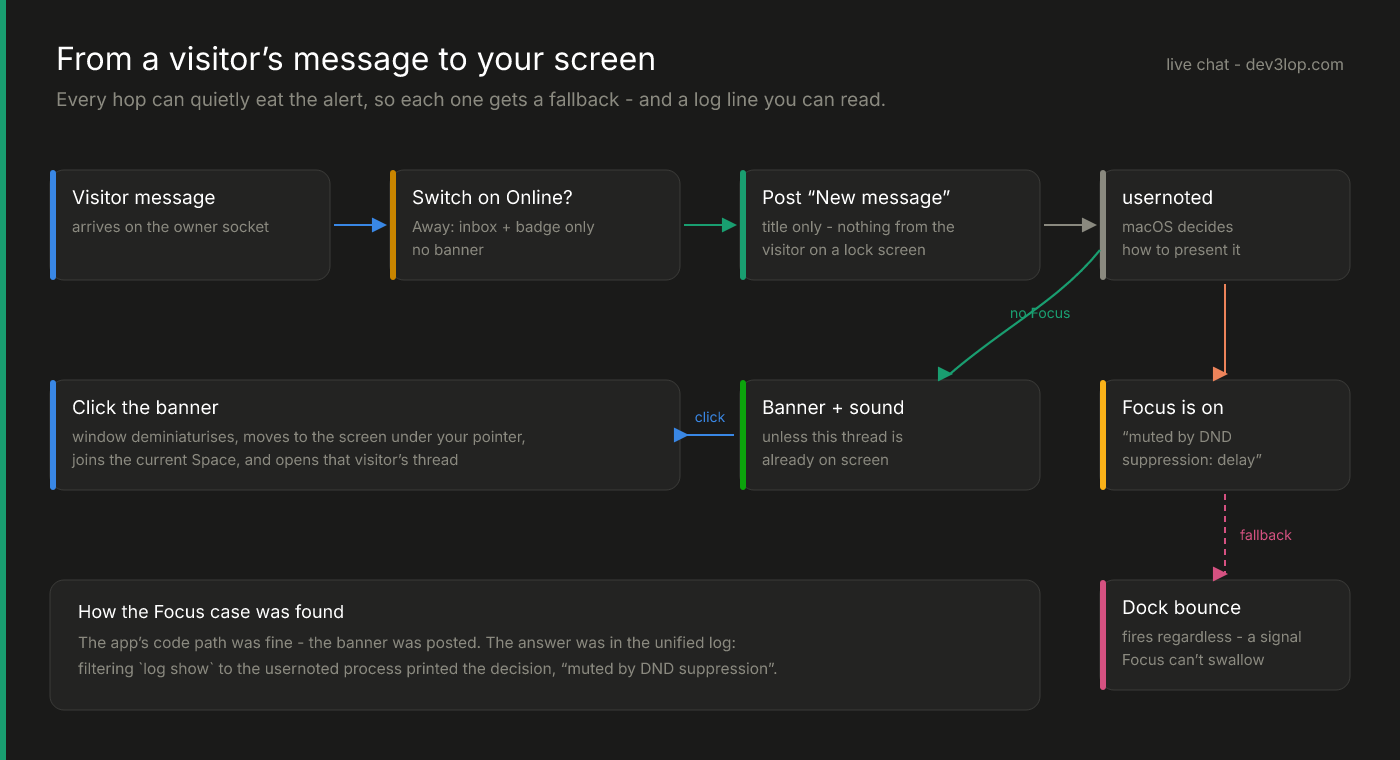
The report was simple: a visitor sent a message and no notification appeared. The code path looked right, permission was granted, and nothing in the app logged an error. The answer was in the unified log, one process over. Filtering log show to usernoted — the daemon that presents notifications — printed its decision for our banner: presenting as banner with sound… muted by DND suppression. A Focus mode was on. Nothing was broken except our assumption.
The fixes are all about giving each hop a fallback:
- Title-only banners. The notification says “New message” and nothing else — no visitor text on a lock screen or a shared display.
- The Dock bounces too, because Focus can mute a banner but not a bounce.
- Banners are suppressed when the thread is already on screen, decided on the main thread (the delegate is called on a background queue, and it reads window state).
- Clicking the banner brings the chat to you. The window may be minimized, closed, on another monitor or in another Space. Instead of making you hunt, the app deminiaturizes it, moves it to the screen under your pointer, pulls it into the current Space, and opens that visitor’s thread.
The last one is a dozen lines — find the NSScreen containing NSEvent.mouseLocation, center the frame in its visible area, set NSWindowCollectionBehaviorMoveToActiveSpace — and it’s the feature that makes the app feel like it respects your desk.
What we’d change with a paid certificate
A Developer ID signature with a provisioning profile would bring back the Keychain (a stable code identity across builds) and allow time-sensitive notifications that can break through Focus when you permit it. None of that was needed to ship. All of it is a clean upgrade path, because the parts that would change are isolated in two small files.
The last post covers the part with the most to lose: securing the public socket and signing a desktop app in with GitHub. If your team needs a native tool built fast without a full Xcode shop, we build those.